
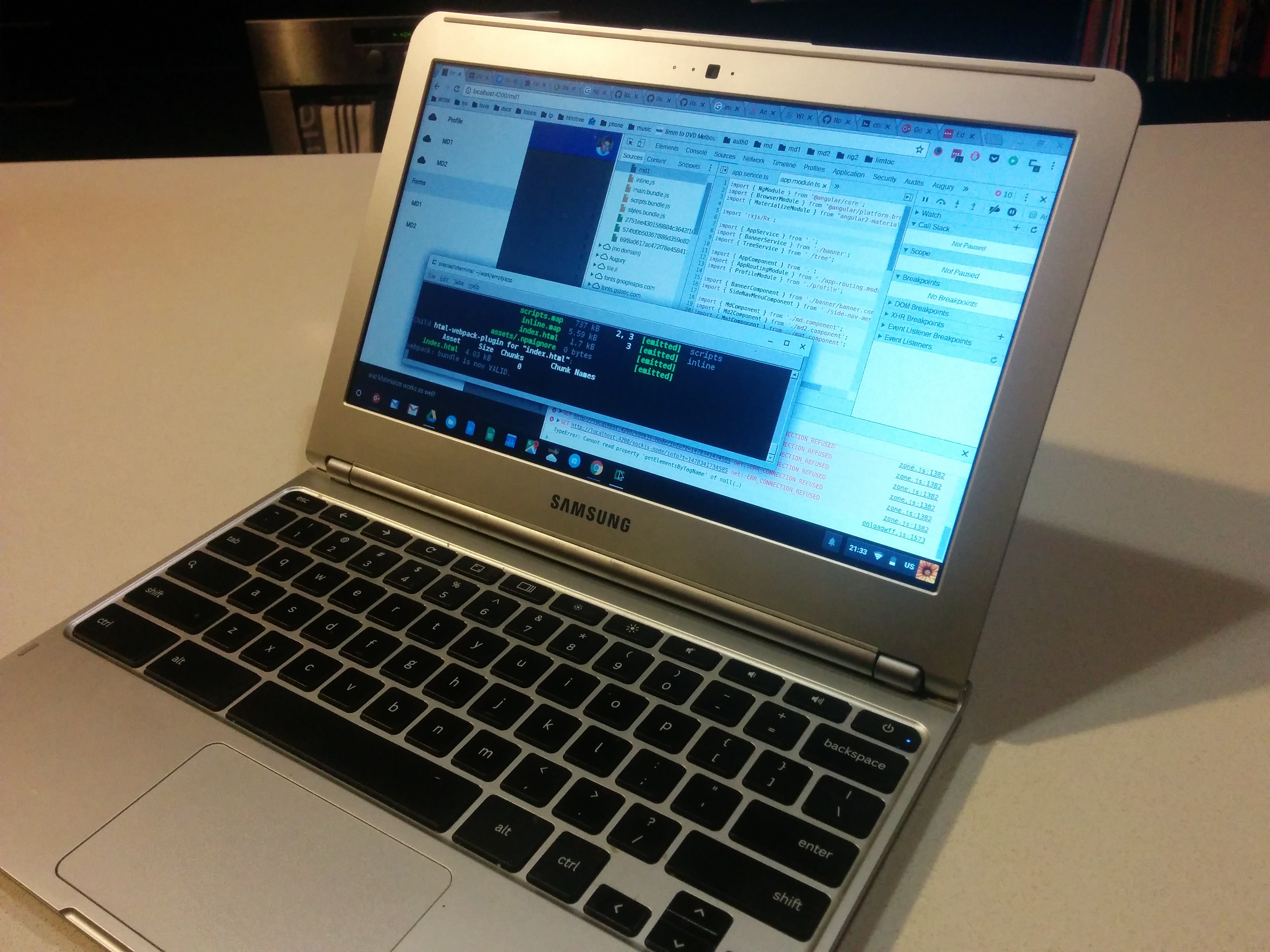
Totally doing the full Angular 2 / Material Design development on an ARM-based Samsung Series 3 Chromebook, one of the world’s cheapest computers.
For my IDE, I’m editing and debugging in the Chrome browser itself. Content is being served locally by Node.js which also runs the unit test server. This is all coming via a crouton chroot on the same machine which is being x-served into a ChromeOS window by Xiwi.
Had to build some stuff from original sources because, well, ARM. Ask me anything, I’m awesome!
 John Hardy Developer
Nifty!
LikeLike
1. What are you developing?
2. You’re running the server on Node.js in a Crouton chroot instance? Why do you need Xiwi if Chrome browser is the client? Can you not manage the chroot from a terminal emulator?
3. How do you like Chrome as a source editor?
4. Which library do you use for unit testing? Is that built-in to Node.js?
LikeLike
1. Right now, I’m developing a generic app framework for Angular 2 that uses Material design. It should serve as a starting point for many apps. It’s a work in progress but you can see it here: https://github.com/jhlagado/emptyapp
github.com – jhlagado/emptyapp
LikeLike
2. Xiwi is not essential by is a nice way to integrate crouton with ChromeOS. It’s for normal Linux apps like the terminal or file manager which you would normally have to switch from ChromeOS into a desktop environment to run. With Xiwi a desktop environment is completely optional.
LikeLike
3. I’ve been using Chrome as my primary editor for about 4 years. It’s good because it’s lightweight and always there. It’s free and it’s not a bowl of kruft like Eclipse. It formats code and understands the 3 main formats. It has source-mapping which means that you can read and debug transpiled sources written in other languages such as TypeScript and Sass.
LikeLike
4. I’m using Karma which is the unit testing framework which comes with Angular. It’s based on Jasmine syntax. I drive the whole thing using the new Angular 2 CLI which serves code, runs tests and builds for deployment.
LikeLike
That’s very cool!
LikeLike
I’d miss sublime-text.
LikeLike
I’m waiting for this beast https://www.kickstarter.com/projects/hybrxpc/ultra-slim-laptop-with-android-51-os-and-remix-os
LikeLike
Multi gas detectors
http://www.vasthi.com/multi-gas-detectors
vasthi.com – Multi Gas Detectors
LikeLike
Each to their own when it comes to IDEs. All I care about is portability.
LikeLike
The Samsung is a 2013 model. There are better things around now I think but I’m actually impressed at how much you can do with such a lightweight computer. No fans or moving parts. It’s basically a mobile phone in a plastic Mac ripoff case.
LikeLike
John Hardy not a Turnbull fan thanks for explaining all that.
Although I am still not quite clear on Xiwi. I haven’t used ChromeOS before, but I was under the impression that it was a Linux-based OS that did graphics with X11 like most all other Linux nowadays. So I would think it had it’s own native terminal emulator, like gnome-terminal or xterm.
I of course have not used Crouton either, so I am missing something here. Whenever I roll my own Chroot environments, I just launch Bash with “chroot” and that is the end of it, the TTY owned by the terminal emulator that I am currently using is now being controlled by a Bash process running in the Chroot environment, so there is no need to launch a separate X11 server or terminal emulator or file manager or anything like that. I would just launch my Node.js server from within the terminal that I used to execute the “chroot” command. Sometimes I install GNU Screen in my chroot environment as well, so I can multiplex the one TTY I am using for the chroot environment to multiple shells.
Or is Crouton not a CLI thing? Is it one of those servers that you have to connect to with https://localhost:8008 or whatever? Is that why Xiwi becomes necessary?
LikeLike
I think you’re missing the vital parts of ChromeOS which is an environment that is built on top of Linux but is heavily sandboxed and doesn’t allow you to do much with the underlying machine. ChromeOS is pretty much restricted to running the Chrome browser, it’s meant for web apps only.
Crouton allows you to chroot and put another desktop (xfce, kde etc) on the same linux and that means you can also install software. It sets up a shared Downloads folder with ChromeOS but the two systems are isolated in every other sense.
Crouton gives you a way of toggling between ChromeOS and whatever other desktops you have but Xiwi gives you the ability to see your chrooted apps from within ChromeOS itself without switching. It’s just a nicety and it’s not essential. Also it has a single app mode which means that you don’t actually need a desktop at all, just the apps.
LikeLike
John Hardy not a Turnbull fan BTW are you available for freelancing? I might have a task for a front end to throw at someone good
LikeLike
That has some similarities with my setup. Editing source code in a browser just makes sense.
LikeLike
Very nice. I have been curious about developing on my Chromebook for a while, but have not found anything satisfactory, perhaps I will experiment with something like this.
Basic question: How much RAM does your system have? I have a newer Chromebook (Acer) but is not especially gifted in the RAM department, at 2GB. It has not been the most stable, frankly, it seems to hang and crash fairly often, but it IS cheap.
LikeLike
The great thing about using the browser-based IDE is that it gives the programmer more control over the look and feel of the code. For example I use image icons to represent keywords or variables. Way too experimental for most production code, but slowly code specifications will be functional and more aesthetically pleasing.
LikeLike
Michael Tufekci If I understand right, he’s not using a browser based IDE, he’s using the built in Chrome Developer Tools to edit code.
If you understood that, I don’t understand how that would allow using image icons to represent keywords or variables.
LikeLike
Kevin C. Well I think we can both agree he is using a browser to write a computer programming specification. Australia does not disappoint my friend.
LikeLike
Stanislav Sinyagin I’m a contractor who specialises in front-end development. I do have a full-time gig (working with Emlyn O’Regan on www.xapiapps.com) but could take on some freelance work depending on the timing and complexity of the project.
LikeLike
John Hardy not a Turnbull fan I recon, my upcoming project would be too simple for your skills. But I’ll keep it in mind, as there are some other ideas popping up, for more serious stuff.
LikeLike
Ronald Gainey the Chromebook I’m using is probably the first decent one that started the whole product category (Samsung Chromebook Series 3 2013). I’ve found it pretty stable but I have yet to really push it on this project. I wanted to use something lightweight because I’m planning to take it travelling. It has moderate specs which sound a bit like your Acer. It is an ARM-based CPU with 2gb ram and 16gb of storage. I haven’t tried expanding that storage with a sd card yet.
For ordinary web development I’ve found it fine. Crouton allows me to run python and provide a simple http server. The chrome browser makes a fine ide. I’ve even run eclipse (built from source) and use git.
For the current project I’m doing something harder. Deploying Node.js was simple enough, they have ARM binaries and I have a method for installing them in my home directory (gets rid of permission problem with Npm).
Angular 2 though is a whole new kettle of fish because it uses a continuous build process which transpiles from TypeScript to JavaScript and has a lot of dependencies. I managed to get them all working but had to build some things from source.
The main thing I learned was to ensure that your g++ compiler is new enough (version 4.9 or later). Node and Npm need to be up-to-date as well. If the CPU had been Intel then I could have used more binaries and built less. That said building went smoothly once I upgraded the compiler from the distribution one.
I’ll let you know about stability issues if there are any. Also if you want any tips about setting up that Chromebook just let me know.
LikeLike
It should be a standard msata SSD inside, so you can easily install a bigger one.
LikeLike
Cool Stanislav Sinyagin just let me know.
I did a quick search about upgrading Chromebooks. It seems that my model is particularly not user upgradable. That’s ok though because so far I can work within its limitations.
LikeLike
Maybe a raspberry pi as a web server would be more suitable for development? It can be powered from your notebook
LikeLike
Or something like this, although in a different price category:
http://s.aliexpress.com/6zuiErAZ
LikeLike
This Chromebook basically is a Raspberry Pi. I used a number of Pi forums to work out how to get the tools running on the ARM CPU.
I would think any of these systems would be suitable for web development.
LikeLike
John Hardy not a Turnbull fan yes, but it still runs ChromeOS and is your desktop. A pure Linux appliance nearby might bring some benefits, although of course it’s an additional device, so your bag gets bigger.
LikeLike
It’s definitely a good idea for development on the road. Right now I’m probably pushing the Chromebook as far as it’s abilities can go. Any further and a second portable server would definitely make sense. I’ll give that a little bit more thought.
LikeLike