

If GitHub stars mean anything then
If GitHub stars mean anything then
The spread operator, which is denoted by three dots … , is a very versatile and powerful feature of modern JavaScript.
It has four major uses:
* array spreads are just a special case of spreads with Iterables (more soon).
Function application simply means calling functions but JavaScript functions come with an apply() method that enables you to call that function while passing an array for arguments.
f = (a, b, c) => a + b + c;
args = [ 1, 2, 3 ]
f.apply(null, args);
Result
> 6
You can use the spread operator as an alternative to apply().
f(...args);
You can also mix and match your arguments
f(10, ...[20, 30])
f(...[10, 20], 30)
f(10, ...[20], 30)
Result
> 60
For a given array:
arr1 = [ 1, 2, 3 ];
you can use the spread operator to create a shallow copy of the array
arr2 = [ ...arr2 ];
Result
> arr2 = [ 1, 2, 3 ];
You can also use the spread operator to prepend an element to an array
arr1 = [ 1, 2, 3 ];
arr2 = [ 0, ...arr1 ];
Result
> arr2 = [ 0, 1, 2, 3 ]
Or you can use the spread operator to append an element to an array
arr1 = [ 1, 2, 3 ];
arr2 = [ ...arr1, 4 ];
Result
> arr2 = [ 1, 2, 3, 4 ]
you can also use the spread operator to concatenate multiple arrays
arr1 = [ 1, 2, 3 ];
arr2 = [ 4, 5, 6 ];
arr3 = [ 7, 8, 9 ];
arr4 = [ ...arr1, ...arr2, ...arr3 ];
Result
> arr4 = [ 1, 2, 3, 4, 5, 6, 7, 8, 9 ]
The spread operator can be used in any location of the receiving object and be mixed with normal key assignments
arr1 = [ 1, 2, 3 ];
arr2 = [ 4, 5, 6 ];
arr3 = [ 100, ...arr1, 200, ...arr2, 300 ];
Result
> arr3 = [ 100, 1, 2, 3, 200, 4, 5, 6, 300 ]
The spread operator for objects works in a very similar way to the spread operator for arrays/iterables but its behaviour is subtly different. It is useful for spreading the key-value pairs of an object into another object
For a given object:
obj1 = { a: 1, b: 2, c: 3 };
you can create a shallow copy using the spread operator
obj2 = { ...obj1 };
Result
> obj2 = { a:1, b:2, c:3 }
you can also use the spread operator to merge multiple objects together
obj1 = { a: 1, b: 2, c: 3 };
obj2 = { d: 4, e: 5, f: 6 };
obj3 = { g: 7, h: 8, i: 9 };
obj4 = { ...obj1, ...ob2, ...obj3 };
Result
> obj4 = { a:1, b:2, c:3, d:4, e:5, f:6, g: 7, h: 8, i: 9 }
you can use the spread operator in any location of the receiving object and mix it with normal key-value assignments
obj1 = { a: 1, b: 2, c: 3 };
obj2 = { d: 4, e: 5, f: 6 };
a = 100
b = 200
obj3 = { a, ...obj1, b, ...ob2, c: 300 };
Result
> obj3 = { a: 1, b: 200, c: 300, d: 4, e: 5, f: 6 }
NOTE: If keys get repeated the value gets overridden with the last assigned value.
NOTE: Key order is preserved in JavaScript based on insertion order.
obj1 = { a: 1, b: 2, c: 3 };
obj2 = { c: 10, ...obj1 }
Result
> obj2 = { c: 3, a: 1, b: 2 }
Object.keys(obj2);
> [ 'c', 'a', 'b' ]
Because the spread operator for objects treats its argument as a simple object. This means that it treats arrays and other iterable types as objects which have their index as a key.
Given the array
arr1 = [ 10, 20, 30 ]
The object spread operator will treat the array as simple object
obj1 = { ...arr1 };
Result
> obj1 = { 0: 10, 1: 20, 2: 30 }
Given the string
str1 = 'Hello';
The object spread operator will treat the string as simple object
obj1 = { ...str1 };
Result
> obj1 = { 0: 'H', 1: 'e', 2: 'l', 3: 'l', 4: 'o' }
The main benefit Typescript offers here is to make the purpose of monadic bind (flatMap) clearer than it would be using dynamically typed JavaScript.
Part 2
https://codewithstyle.info/advanced-functional-programming-typescript-monads-generators/
Part 3
https://codewithstyle.info/advanced-functional-programming-typescript-functional-exceptions/
“Class” syntax in JavaScript is not awesome.
Use with caution, favour composition over inheritance, don’t inherit more than once.
JavaScript is not Java.

Storing data with the Clown.
Clown-based storage.
Leveraging the power of the Clown.
Clown computing.
—Jason Scott
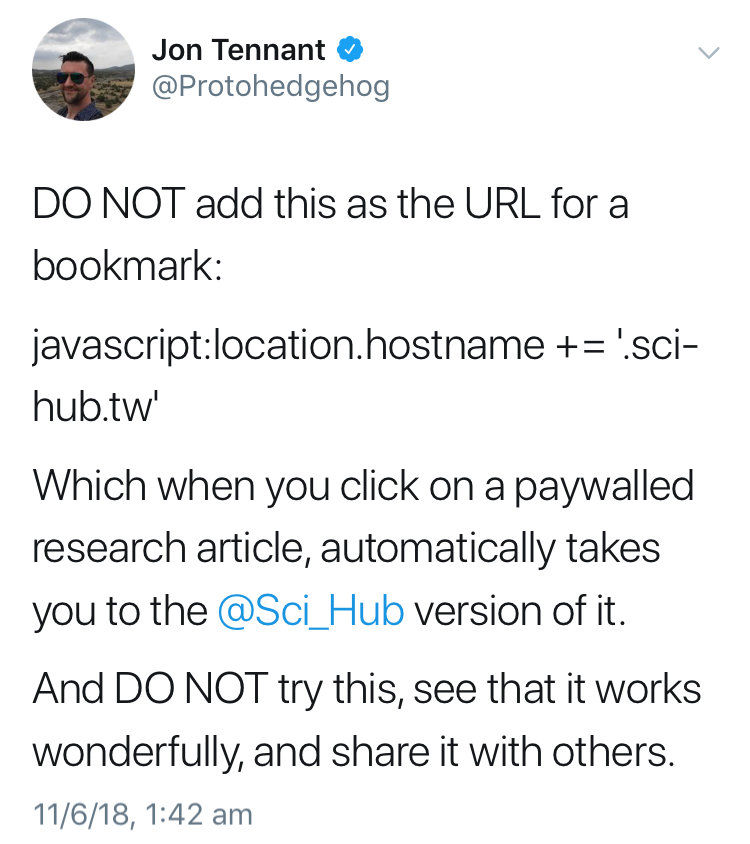
I DO NOT recommend this practice.

OK that’s taking things a bit far, Microsoft.
Andre Staltz explains a unification of asynchronous functional handlers called callbags.
With this model you can make simple composable streaming functions (like callbacks, promises and observables) which allow for two way conversations.
In other words sinks that can also be sources and vica versa, emitters that can also be listeners and vica versa.
This is kind of what happens when you screw your developer base.
The Angular team chose not to provide and automatic upgrade path from AngularJS to Angular and instead concentrated on serving Google’s internal needs. As a result many developers felt abandoned and started to look elsewhere. They started to checkout other frameworks like React and most never came back.
Not shown on this chart is Vue.js which also became a huge beneficiary of the Angular team’s navel gazing. It’s currently creeping up to replace AngularJS is in the number 2 position.
The only thing saving Angular from total oblivion is a combination of corporate inertia and fullstack Java developers who from what I can tell honestly seem to think that Typescript is a dialect of Java and Angular is a flavour of Spring Boot for the browser.
 John Hardy Developer